Project Overview
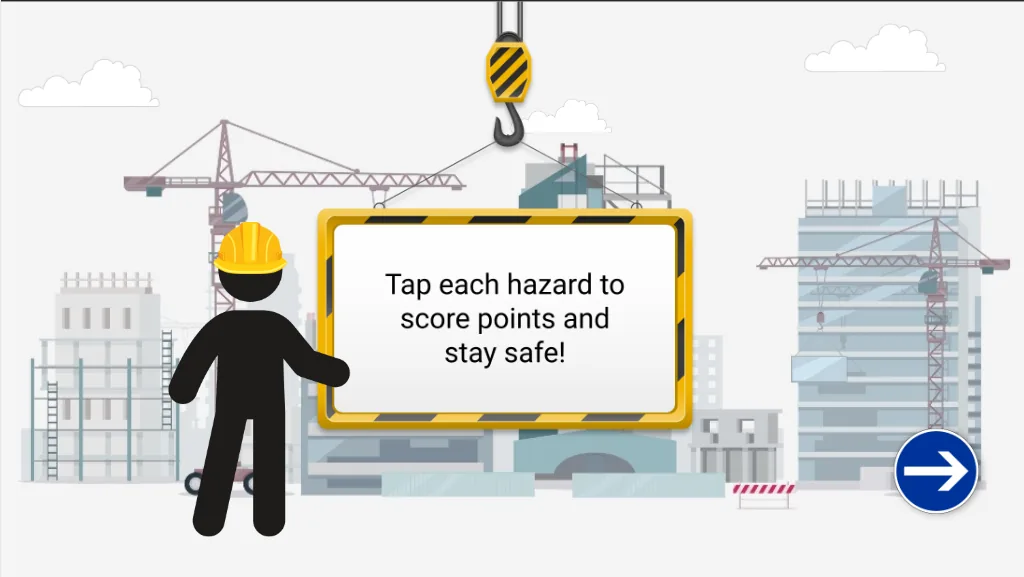
The Construction Site Safety Walkthrough Simulation was designed to improve hazard identification skills for learners entering construction environments. Developed in Articulate Storyline 360, the experience places learners in the role of a worker conducting a virtual site inspection, requiring them to identify unsafe conditions before incidents occur.
The project was created to support visual learning and workplace readiness by exposing learners to realistic construction, warehouse, and working-at-height scenarios within a safe digital environment.
Rather than relying on text-heavy content, the simulation uses scenario-based observation activities that encourage learners to actively identify hazards, interpret workplace situations, and apply safety knowledge in context.
The Challenge
The stakeholder required a learning solution that could effectively support learners with varying literacy levels while reinforcing critical hazard awareness skills commonly encountered on construction sites.
Key requirements included:
- Creating realistic workplace environments without overwhelming learners with excessive visual complexity.
- Ensuring hazards were immediately recognisable for beginner and low-literacy learners.
- Supporting visual learning through observation and decision-making rather than lengthy written explanations.
- Maintaining consistency across multiple environments and scenarios.
- Providing an engaging alternative to traditional compliance-based safety training.
- Aligning scenarios with common construction, warehouse, roofing, and working-at-height risks.
A significant challenge involved balancing realism with simplicity. While hazards needed to reflect authentic workplace situations, the environments also needed to remain visually clean and accessible to prevent cognitive overload and allow learners to focus on the safety risks being assessed.
My Approach
To address these requirements, I designed a series of custom vector-style environments and character assets that could be deployed across multiple safety scenarios.
The visual assets were initially generated using AI image generation tools to rapidly prototype environments, characters, machinery, and workplace hazards. Rather than using the generated images directly, I refined, edited, and standardised the assets using Canva and Adobe Photoshop to ensure they met stakeholder expectations, branding requirements, visual consistency standards, and instructional design objectives.
This process involved:
- Creating detailed prompts to generate workplace-specific scenes and hazards.
- Iteratively refining assets based on stakeholder feedback.
- Editing colours, layouts, proportions, and environmental details.
- Removing unnecessary visual noise to improve learner focus.
- Standardising character design across multiple scenes.
- Creating reusable visual assets that could be repurposed throughout the learning experience.
The experience was built around a recurring worker character who guides learners through different workplace environments, creating continuity throughout the learning journey.
Custom environments were developed for:
- Residential construction sites.
- Crane and lifting operations.
- Warehouse environments.
- Working-at-height scenarios.
- Site inspections and hazard walkthroughs.
Scenarios were designed around common workplace risks including:
- Workers positioned beneath suspended loads.
- Working near unprotected roof edges.
- Forklift and pedestrian interaction.
- Chemical spill hazards.
- Falling object risks.
- General construction site safety observations.
Within Storyline 360, interactions were developed using layers, states, variables, triggers, and custom navigation controls. Learners explored environments, identified hazards, received contextual feedback, gained points and progressed through various safety situations.
A reusable asset library was created to ensure visual consistency, streamline future development, and support rapid expansion of additional safety scenarios.
Key Features
- Interactive hazard identification activities.
- AI-assisted asset creation workflow.
- Customised visual assets refined in Canva and Adobe Photoshop.
- Reusable animated worker character system.
- Construction, warehouse, and working-at-height environments.
- Scenario-based workplace safety learning.
- Visual-first design for low-literacy learners.
- Storyline 360 interactions and custom logic.
- Progressive hazard recognition challenges.
- Consistent visual design system across all scenarios.
- Reward setup like a game.
- Scalable asset library for future learning modules.
Outcome
The project transformed traditional hazard awareness content into an interactive visual learning experience that encourages active observation and decision-making. By combining instructional design principles, Storyline development, AI-assisted asset creation, and graphic design tools such as Canva and Adobe Photoshop, the solution provided learners with a safe environment to practise hazard recognition before entering real-world worksites.
The modular design approach also established a scalable framework for future workplace safety simulations, enabling additional environments, hazards, and learning pathways to be developed efficiently while maintaining visual and instructional consistency.