Project Overview
The MEWP Explorer was designed as an interactive reference and learning aid to help learners understand the different types of Mobile Elevating Work Platforms (MEWPs) and their intended applications.
The primary objective was to provide learners with a clear, accessible way to compare MEWP categories, understand their unique features, and identify appropriate use cases without overwhelming them with excessive navigation or interaction.
The solution was developed for new MEWP operators and learners undertaking working-at-heights training who required a foundational understanding of the various platform types before progressing to operational and safety procedures.
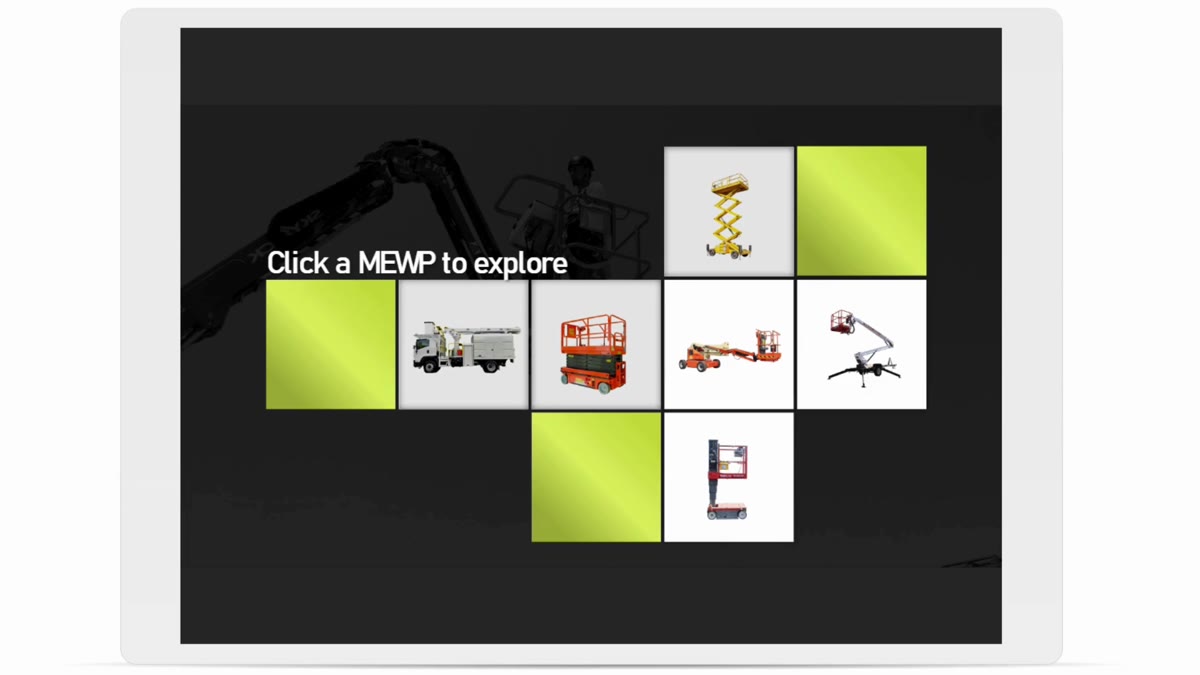
The experience presents all MEWP categories within a single screen, allowing learners to explore information through simple click-and-reveal interactions while maintaining a consistent learning environment.
The Challenge
For new operators, many MEWP categories appear visually similar and often share overlapping capabilities. Learners frequently struggle to understand:
- The differences between MEWP types.
- When a particular platform should be selected.
- The environments each machine is designed for.
- The unique advantages and limitations of different equipment.
Stakeholders wanted an elegant and sleek design that would simplify comparison and improve learner understanding while avoiding unnecessary interactions or complex navigation.
A key requirement was ensuring the experience remained accessible and supportive for neurodiverse learners by reducing cognitive load and limiting movement throughout the learning environment.
My Approach
Working closely with stakeholders, I designed a single-screen exploratory learning experience that allowed learners to view all MEWP categories simultaneously.
Rather than requiring learners to navigate between multiple screens or scenarios, each MEWP type could be selected directly from a central visual layout.
When selected, concise information was revealed within a dedicated content area that remained fixed on screen throughout the experience.
This approach allowed learners to:
- Compare multiple MEWP types quickly.
- Maintain visual orientation.
- Reduce memory load when reviewing information.
- Learn at their own pace.
- Revisit information without navigating away from the learning space.
Key Features
1. Single-Screen Learning Environment
All MEWP categories were presented within one consistent interface, eliminating unnecessary page transitions and reducing learner disorientation. This design choice supported learners who benefit from predictable and stable learning environments.
2. Click-and-Reveal Information Architecture
Each MEWP acted as an interactive hotspot. Selecting a platform revealed:
- A brief description.
- Typical use cases.
- Suitable work environments.
- Key operational characteristics.
- Distinguishing features compared to other MEWP types.
This allowed learners to explore information on demand while avoiding information overload.
3. Visual Comparison Design
The layout was intentionally designed to support comparison between equipment types. By keeping all platforms visible, learners could easily identify similarities and differences without relying on memory or repeatedly navigating between screens.
4. Neurodiverse-Friendly Design
A significant design consideration was minimising cognitive load. The experience incorporated:
- Consistent screen layout.
- Limited animation and movement.
- Predictable interaction patterns.
- Chunked information presentation.
- Clear visual hierarchy.
- Reduced reading burden.
These principles helped create a calm and focused learning environment.
Design Considerations
Stakeholder feedback emphasised the importance of maintaining a professional and uncluttered experience. To support this objective, the solution intentionally avoided:
- Excessive animations.
- Complex branching interactions.
- Multi-layer navigation structures.
- Unnecessary gamification elements.
Instead, the design prioritised clarity, usability, and efficient information retrieval. The result was an experience that felt modern and interactive while remaining highly accessible and learner-focused.